Up-to-date drivers
Windows Update, NVIDIA, Microsoft catalogue: each update is downloaded over HTTPS from a known source, its signature checked, then installed one by one.
Pilotes à jour. PC nettoyé. Jeux boostés. Yeux reposés.
4 logiciels gratuits pour Windows.
A twenty-second scan, official sources, and the exact list of what to update. What it could not check, it tells you.
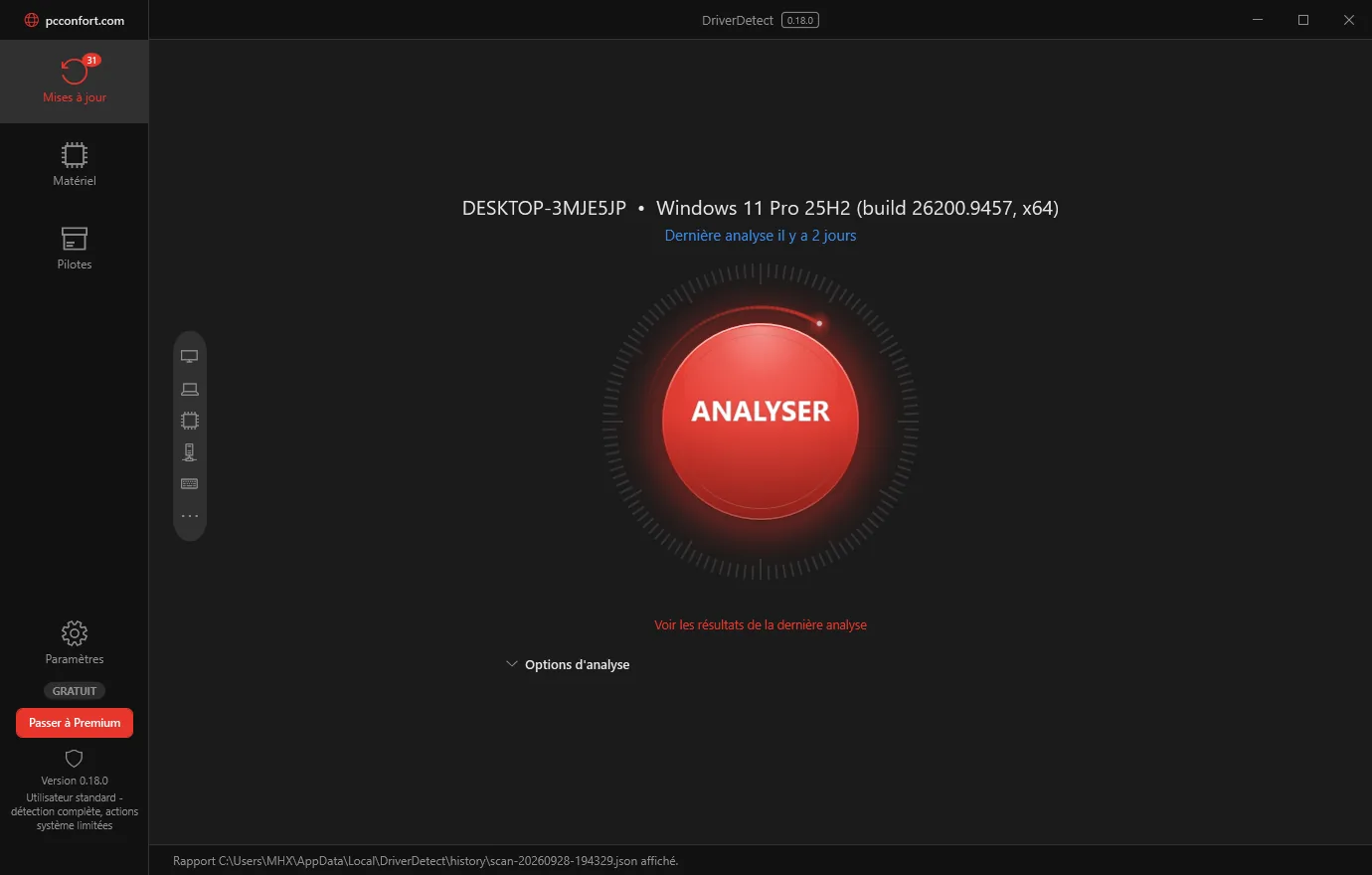
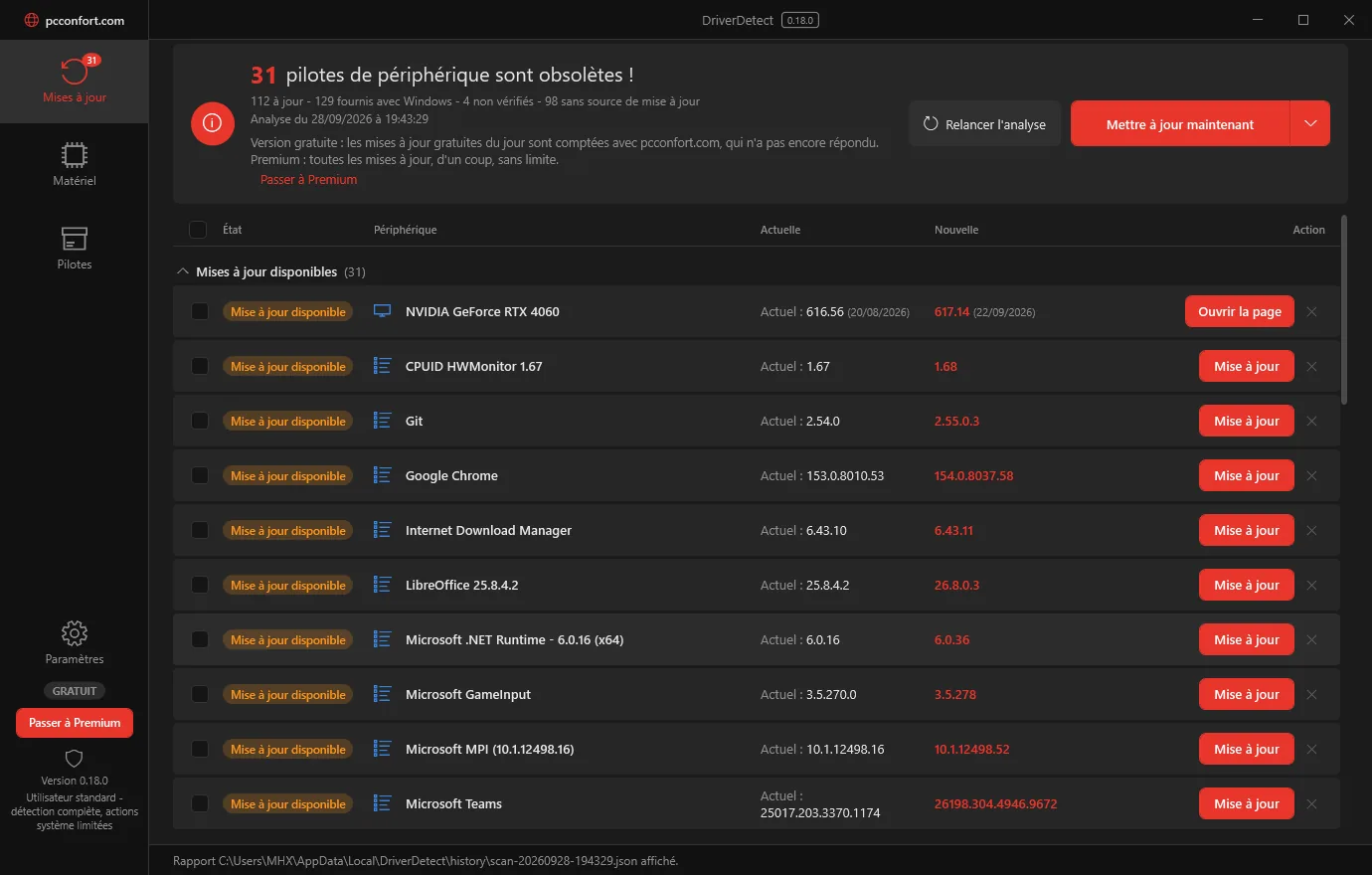
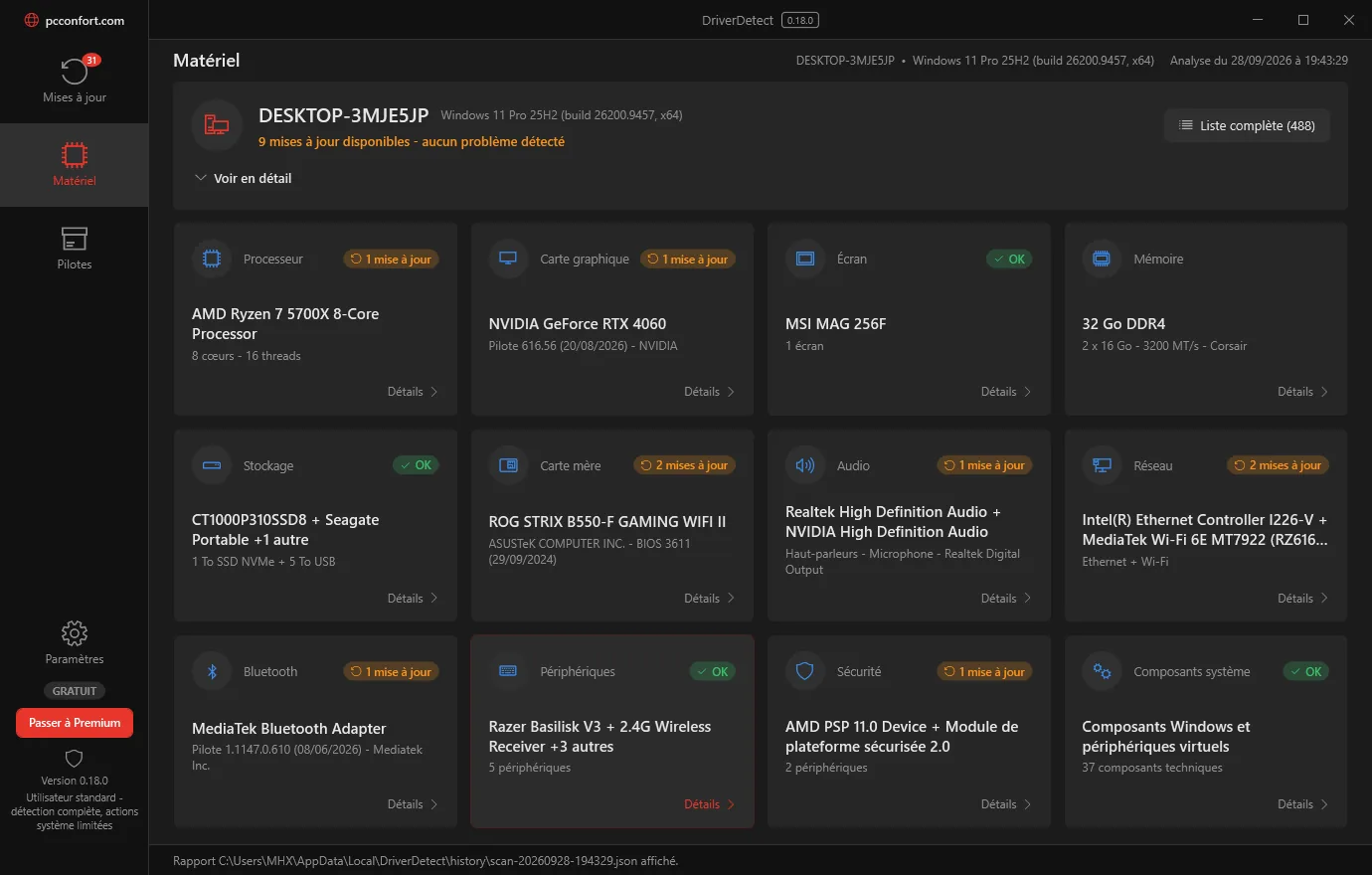
Windows Update, NVIDIA, Microsoft catalogue: each update is downloaded over HTTPS from a known source, its signature checked, then installed one by one.
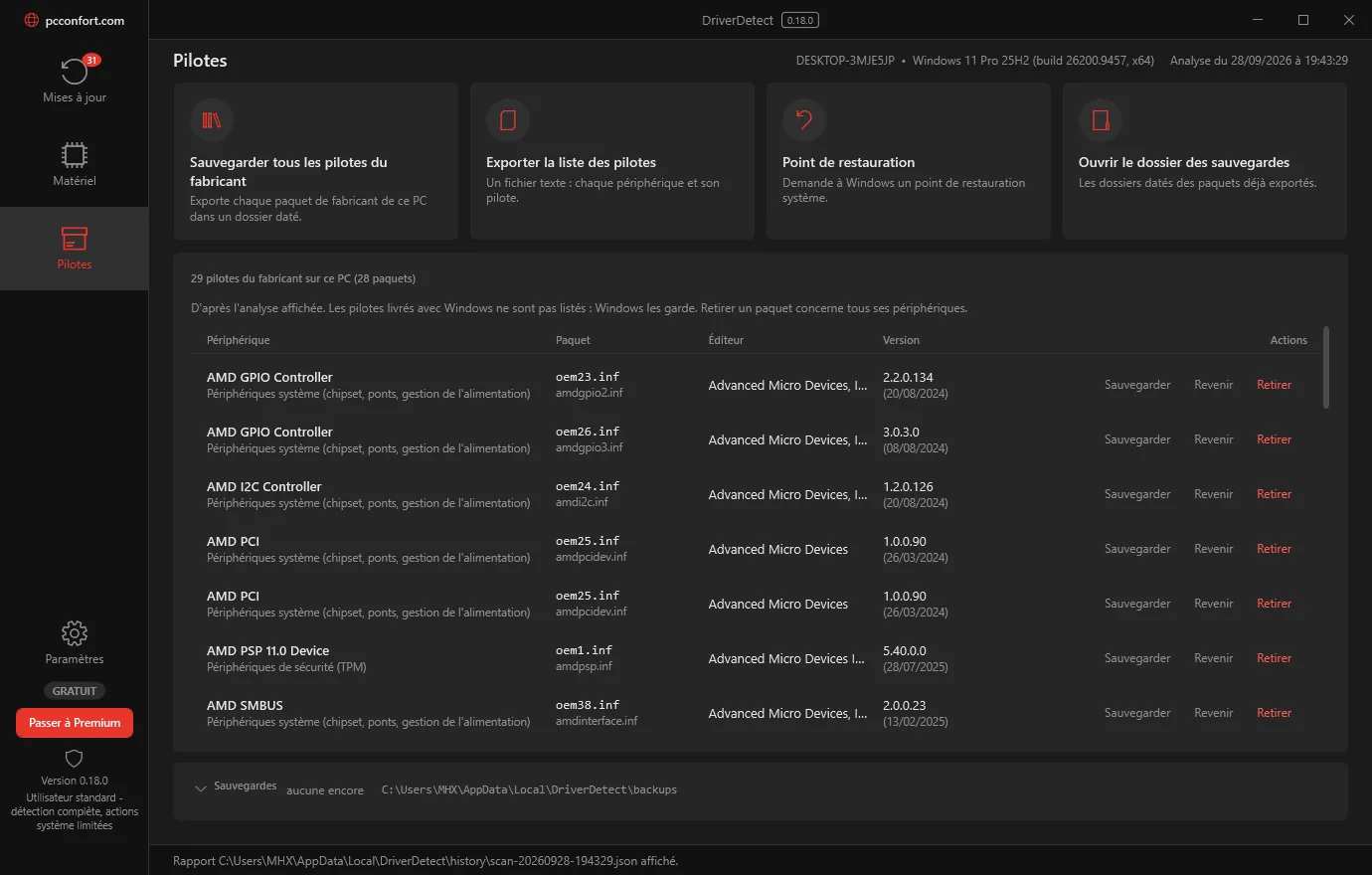
One driver, or every manufacturer driver, set aside before anything is touched; “Restore this package” puts them back as they were.
An update you do not like? Back to the driver before, as in Device Manager, in one click and with nothing to look for.
The whole package, like “Delete the driver” in Device Manager: the confirmation names the devices concerned, the backup is made first, and Windows always keeps its own.
Every device with its driver, publisher, version and date, exportable as a text file to keep or to send.
Your PC in tiles: processor, graphics card, disks, memory, screen, network, with the detail one click further.
Cleaning, registry, disks, start-up, programs: PC Confort Center takes care of them. The game boost is Gaming Booster. DriverDetect only does drivers now, and does them well.
PC Confort Center sees DriverDetect, reads its last analysis, opens it on the right page and shows its history: analyses, updates, backups, roll-backs.
It is offered before the scan, created before your eyes with its percentage, and every action is logged. You can go back, exactly, even after a restart.
Every report states which sources were actually queried. “No update found” means “none found by these sources”, never anything else. JSON, CSV and HTML reports included.
Bright light in the morning, a warm tint in the evening, set to your hours. The brightness never moves.
Eyes Guard's settings are based on published scientific studies and on the recommendations of health authorities.
Eyes Guard is not a medical device and does not replace the advice of a doctor or an eye specialist.

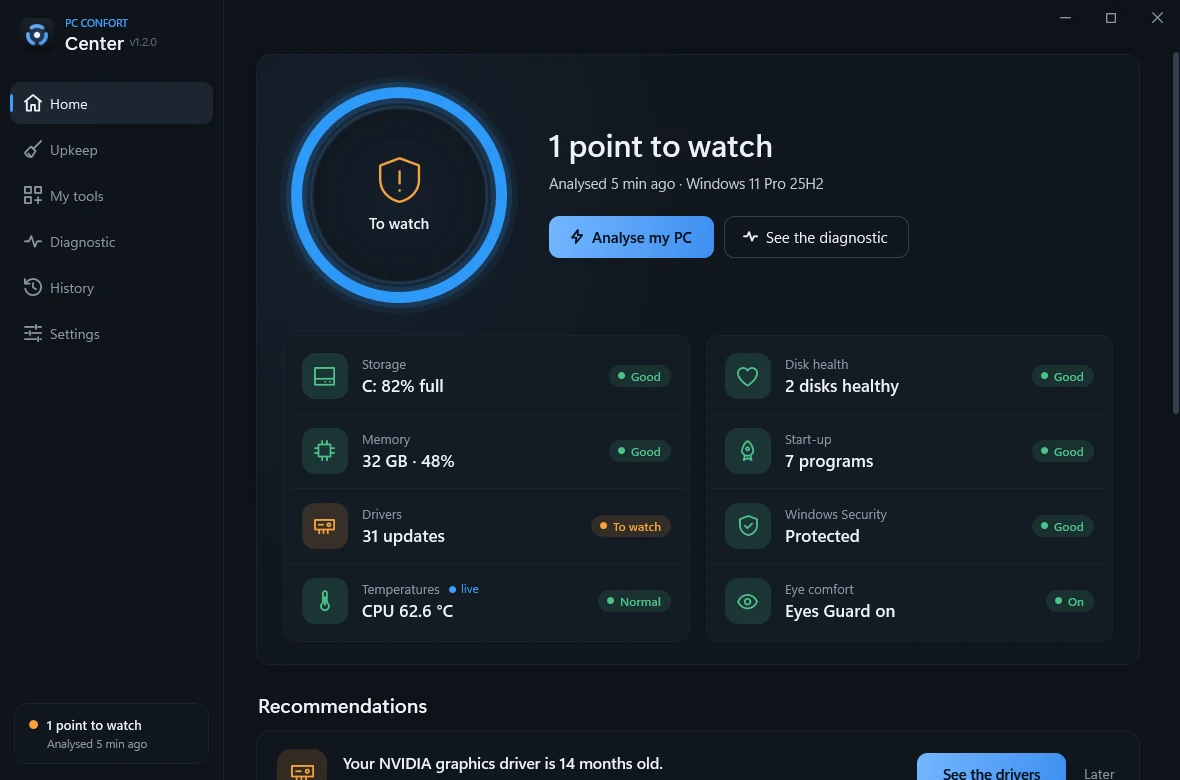
It checks your PC, tells you what is wrong in plain words, and fixes it in one click. Nothing changes without your say-so.

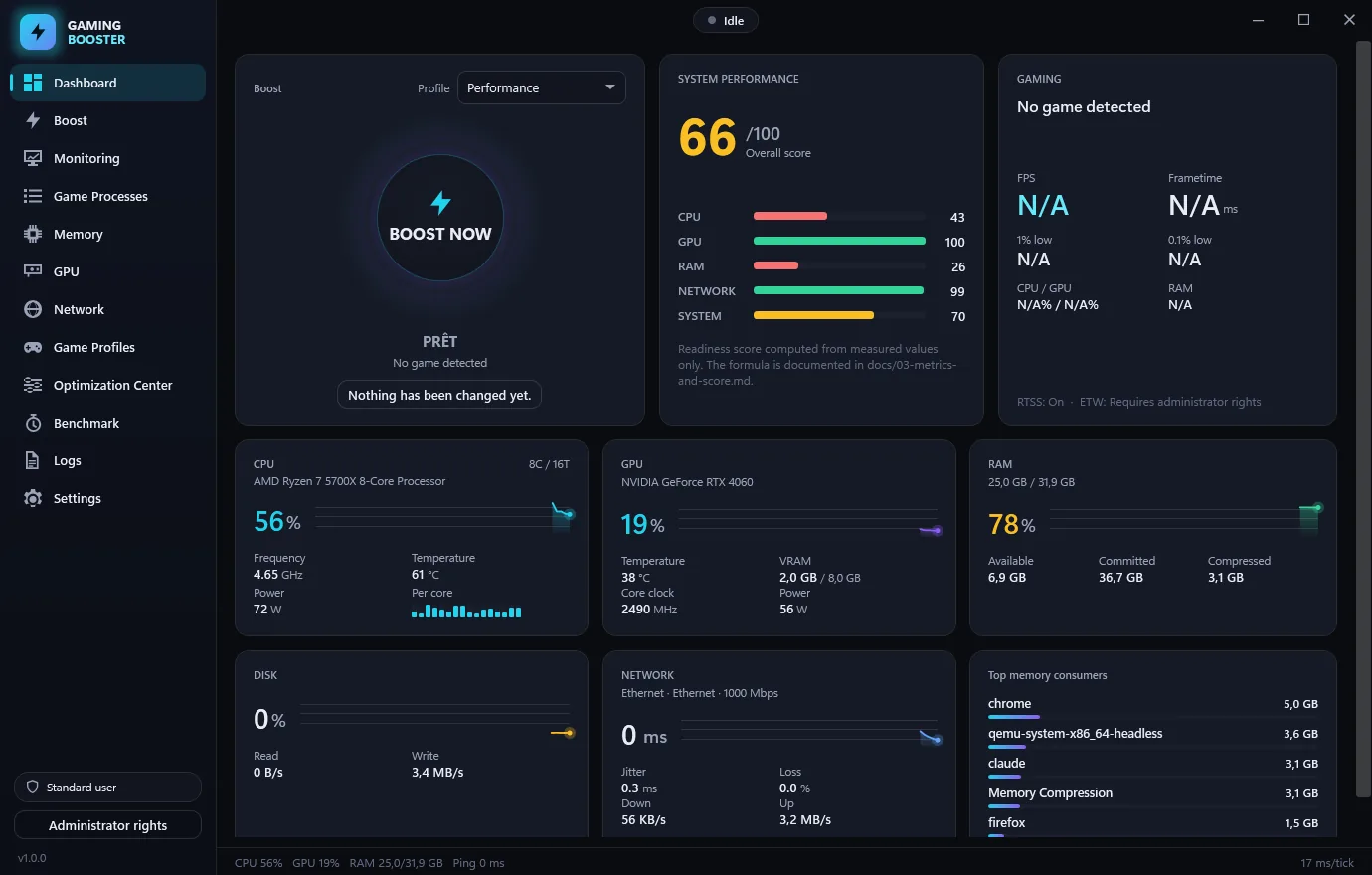
Before the game, your PC switches to game mode. After, everything goes back to how it was. Every number shown is measured, none is made up.
One file, a scan that only reads, and actions you choose one by one.
A single file, nothing else to install: no .NET, no library, no hidden download. It installs in your user profile, without administrator rights.
A few secondsThe analysis only reads. Drivers in DriverDetect, useless files, registry and start-up in the Center: nothing is changed until you have ticked and confirmed.
About 20 secondsA restore point is created, then each action is applied and logged. One click to go back, exactly as before.
You stay in controlUn optimiseur de PC est l'endroit le plus facile du logiciel pour mentir. Voici les 4 choses que nous refusons, écrites noir sur blanc.
Your scans stay on your PC, and no account is required. One anonymous statistic a day helps count the PCs: you can turn it off.
No “1,247 problems found!”. Every number on screen breaks down into the list of items measured.
No action without your selection and your confirmation. Files go to the Recycle Bin, and the registry is exported first.
No “RAM cleaning”, no score out of 100, no services disabled at random. Only what is proven on your machine.
Free forever. Premium removes the limits, and a single key unlocks them all.
Go yearly: 4 months free, up to 37% less than paying monthly.
No commitment, but it costs more: go yearly and get 4 months free.
Drivers always up to date
€19.90 / year
that is €1.66 a month −33%
1 PC · one year, no subscription
For the price of a coffee a month
€2.49 / month
1 PC · no commitment
Every PC Confort tool, a single key
Separately, for 3 PCs: €39.89
€29.99 / year
that is €2.50 a month −37%
3 PC · cancel in two clicks
For the price of a café coffee a month
€3.99 / month
3 PC · no commitment
25% less than the programs bought separately
A single key for 3 PCs, accepted by every program.
Unlock everything Unlock everything
Rested eyes, from morning to night
€14.99 / year
that is €1.25 a month −37%
3 PC · cancel in two clicks
For the price of a baguette a month
€1.99 / month
3 PC · no commitment
The analysis of your drivers and 2 updates a day, Eyes Guard's evening tint, all of Gaming Booster, 1 clean-up a day in the Center: without paying, with no time limit.
The key is accepted by each program: enter it once in the Center, or in each program. Already have a key? In DriverDetect: Settings › Licence › Activate a Premium key. The key is checked by pcconfort.com and remembered on your PC.
The apps work without an account. Create one to find your downloads, hear about new versions and keep your licence keys in one place.
Yes. The program is not signed with a commercial certificate, which triggers the SmartScreen warning on any recent, little-known software. Click More info, then Run anyway. Only download our files from pcconfort.com.
No, neither to install nor to analyse: DriverDetect installs in your profile. Only a few actions (installing a driver, removing a driver package, cleaning or repairing from the Center) ask for elevation at the very moment you start them, through the usual Windows prompt. Eyes Guard also installs without administrator rights: only the optional unlocking of the “extended colour range” opens the Windows prompt, and it is then reg.exe, Windows’ own tool, that writes a single value in the Registry.
Every program downloads and runs for free. The free version of DriverDetect analyses your drivers and installs 2 a day; Premium removes the limit, adds the reports and unlocks the PC upkeep in the Center, from €2.49 / month. The key arrives by email as soon as you pay. Eyes Guard Premium adds 20-20-20 eye breaks, advanced filters, exceptions, weekend hours and a dark theme at sunset, from €1.99 / month.
Your scans stay on your PC: no reports are sent. Each program sends one anonymous statistic a day (a random number, its version, the Windows version, the language, Premium or not); the site works out the country and city from it, then forgets the address. You can turn it off in the program’s settings. DriverDetect also contacts pcconfort.com to check a Premium key and to keep the free edition’s daily counter; it then sends a fingerprint of the Windows installation (a hash), the PC name, its version and the language, never the hardware or the drivers. Updates come straight from Windows Update, NVIDIA or the Microsoft catalogue. On the website, only what you enter when you create an account: a name and an email address. Eyes Guard contacts pcconfort.com once a day to find out whether there is a new version, sending nothing but its version number; with Premium, it also checks its licence, with the same information as DriverDetect.
A restore point is offered first, the old driver is backed up, and every action is written to a log. You go back from DriverDetect or from Windows System Restore.
Never. The brightness gain is locked at 100%: only the tint changes, from the cool white of the day to the warm 2,200 K of the evening. You choose the limits.
Settings → Apps, or Uninstall.exe in the installation folder. The automatic scan task is removed, and your scan history is deleted only if you say yes: it is your data. Eyes Guard uninstalls the same way: the screen gets its normal colours back at once, and your settings are only deleted if you ask.
Yes: Windows 10 and Windows 11, 64-bit. ARM64 PCs run the apps through Windows’ x64 emulation.
DriverDetect and Eyes Guard come in French and English; they follow Windows’ language. The website is also in Spanish, German, Turkish and Arabic.
With DriverDetect, free: in about twenty seconds it queries Windows Update, NVIDIA and the Microsoft catalogue, then lists the drivers to update. Each driver is downloaded over HTTPS from its source, its signature is checked, and the old one is backed up first. The free version installs 2 a day.
With PC Confort Center, free: in a few seconds it checks storage, disk health, memory, the programs that start with Windows, drivers, security and temperatures, then tells you in plain words what is wrong. Nothing changes without your consent. Free: 1 clean-up a day; Premium removes the limit.
With Gaming Booster, free: before the game it switches the PC to game mode (power plan, the game's priority, greedy programs paused), lists everything it did and undoes it at the end. During the game it measures frames per second, temperatures, memory and network latency.
With Eyes Guard, free: the screen's tint goes from the cool white of the day (6,500 K) to the warm 2,200 K of the evening, at your wake-up and bedtime hours or with the sun. Brightness stays at 100%: only the tint changes, 1 K at a time. Full-screen games are tinted too.
Download, scan, and decide for yourself what changes. Twenty seconds to know exactly where your machine stands.